Google Search Tips and Tricks
4
Photo courtesy PhotoXpress.com
There are many ways to use Google search to find information, but a dedicated blogger needs to know which ones are likely to help him get the information he needs.
For basic Google search tips and tricks using the Google’s tips and tricks pdf is as good a place to start as anywhere. But I was a bit surprised to find how little it actually tells you.
OK it shows you how to find exact phrases, how to screen out unwanted results using a – symbol and a few other helpful modifiers. But if you are blogging and looking for ways to suss out the competition and find long tailed keywords that are highly audience targeted, then it doesn’t really help.
So if you want some Google search tips and tricks that might actually help, then read on.
[ad name=”Adsense1″]Using Google Search Tips to Suss out the competition
If you enter a search phrase into the inquiry box such as Google search tips and tricks with no limiters you are likely to get around 512 million sites returned.
Not very helpful really because you are getting results for each and every word in the phrase.
But add inverted commas either end of the phrase i.e. “Google search tips and tricks” so that only get exact matches for that phrase and you will find that the results now come down to about 20,500 results. A hugely significant reduction that tells you what the competition level is like for that specific phrase. I would suggest that 20,500 is a lot more attractive than 500 million plus in terms of whether you want to try and compete. A general rule of thumb is that if you get more than a million results using the second method, you might want to think about whether it is worth trying to compete against that keyword or phrase.
Now here is another step you can take, type in allintitle:”Google search tips and tricks” and you will see that the competition for the exact phrase in the title of a blog or website is only around 200. Which means that if you place this phrase in the title of your blog post or on one of your websites you will only be fighting against 200 plus other sites. I think you will realize that this is quite useful to know.
So what about finding out about the quality of the websites you are up against, pretty easy really. If you have the Google toolbar plugin on your browser and have included page rank as an option, then all you need to do is click on the first result and find out what their page rank is. It’s also a good idea to click on the last result on the first page to see what that is.
I can say that at the time of writing the results ranged from PR3 as the first result to PR0 as the last result. Logically then if your post or website is ranked PR1 or higher then you really should be on the first page of Google if your title includes that exact phrase.
It is also worth knowing that page rank is awarded according to the number of inbound links a page has and more recently the level of social media interest the page has for it i.e. social signals that are indicated by the number of likes, shares +1’s and so on.
Of course there is more to it than that, it’s no point finding a phrase that is never searched on for instance. Because beating the competition into the dirt for something no one searches for is hardly worth the effort, well actually it’s not worth the effort at all.
Finding Long Tail Keywords
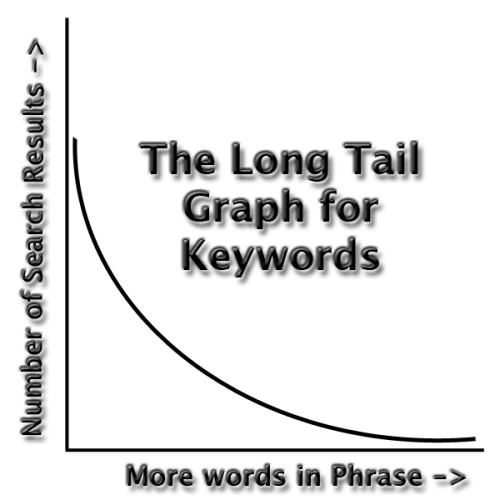
First of all, what exactly is a long tailed keyword? The term comes from statistics and refers to ‘long tail distribution’ in for example a supply and demand chart. The head of the curve sits in the high demand and high supply region of the graph and in keyword terms is where a single word keyword would sit.
At the other end of the curve is the long tail which sits in the low demand and low supply region of the graph. In terms of keywords it is where keyword phrases with 4 or more words in the phrase would sit. The significance of this being that there is: –
- Lower content supply
- Lower demand and competition
- But a higher target audience factor
This is in direct contrast to a single word short tail keyword like ‘holiday’ where, for example, you are likely to get a massive set of search results but don’t really answer the enquirers question because the results are too broad. Go to a long tail query like ‘holidays in the South of France’ and the search results will give up less results but they will be more targeted. So for someone who only wants a holiday in the South of France they will get results they are more likely to click on, and from your perspective you will be competing with less people for that click.
Now you need to know where to find those long tail keyword phrases. You can start off my putting yourself into the shoes of the person entering an inquiry into the search engine, what would you write if you wanted a particular product, service or piece of information.
Once you have thought about a few different options you can start to write them into Google and if you are in the standard view page (the default) you will notice that Google Suggest starts to kick in with help in making suggestions as to what you are looking for. This is live data, these suggestions represent what people have been entering into the search engines recently and the more you type the longer the suggestion becomes i.e. get to 4 words and you have a recently popular long tail keyword.
You will still need to do further research into the viability of any phrase you identify and assess whether it is a term worth focusing on, but you do now at least have a means of finding some potential keywords for further investigation. The recommendation is that you focus about 70% to 80% of your writing to the long tail and about 20% to 30% to the short tail, because you never know when you might get lucky.
Using Google search tips to find long tail is actually becoming more important due to changes in the humming bird algorithm where Google are now attempting to better understand search inquiries that are longer and more complex. They actually expect people to put more words into an inquiry as they become more savvy about how to search for the information they want i.e. searches are becoming much more specific. The rules with respect to over-optimization still apply however, don’t overdo it or you will get penalized and overuse of long tail will be much more obvious.
I feel a lot more folks require to read this, very good info.
I just want to add that you can you Google Wonder wheel to find long tail keywords. Cheers!
Actually the Wonder Wheel has now been retired as a function of Google search, as have several other search features. Google like to keep everyone on their toes.
URL search works the same as Title Search except for the fact that the words in the URL (Permalinks) alone are searched.